Your eyes are probably taking a huge beating. Here's everything I did to fix mine — including a free app I built for you.
👁️ I Built Y'all an App Because My Eyes Were Dying 👁️.
BY ALEX TONG·TAGGED Everyone
FIG. 006Your eyes are probably taking a huge beating. Here's everything I did to fix mine — including a free app I built for you.
Whether you're an engineer, a product manager, a designer, or literally anyone working in 2026 and probably staring at Claude / ChatGPT 24/7 — your eyes are probably taking a huuuuuuuuuge beating. And whether or not you've started to experience eye pain, I'm here to give you some relief.
Because I did.
About six months ago, between all of my infinite side projects plus the eight hours a day I was working, I started to notice really really sharp eye pain. I went to my eye doctor and he basically told me I was overstraining the muscles in my eye that help me view things close up — your ciliary muscles. These are the muscles that do all the focusing work when you're staring at a screen. And it was the kind of pressure that hurt so bad that I had to just close my eyes. I felt some relief by putting pressure on my eyes or putting a heat pad on them.
So I went down a rabbit hole on eye health, and that's what I'm writing about today. Eventually it also led me to build a free app for all of y'all to solve both my problem and hopefully what will not be your problem.
If you're staring at a screen for 8+ hours a day and NOT doing anything about it — this article is for you.
The 20-20-20 Rule — And Why It Might Not Be Enough
So you've probably heard of the 20-20-20 rule, and if you haven't, let me just break it down for you. Basically since the late 1990s when computer use got very common, eye doctors started to advise that every 20 minutes you should look at something at least 20 feet away for 20 seconds.
Now, the actual research behind these specific numbers is not great. While most researchers agree that the methodology is correct, what they don't agree on is how long you should be looking away and how far you should be looking away.
But what exactly is the science behind this? Well, your ciliary muscles — the ones helping you focus when you stare at a screen — basically need time to relax. If you think about it like working out:
Picture your eyes are biceps and you've been doing bicep curls for 8 hours without any breaks jacked up on pre work out. That's what you're doing to your eyes every single day. Yes, exactly that.
The American Optometric Association actually recommends you take a full 15-minute break every two hours of screen time on top of the 20-20-20 rule.
The point of all this is basically — you should be taking breaks from your screen regularly and you should be looking far away when you do that, because you need to rest the muscle in your eye that helps you see things up close.
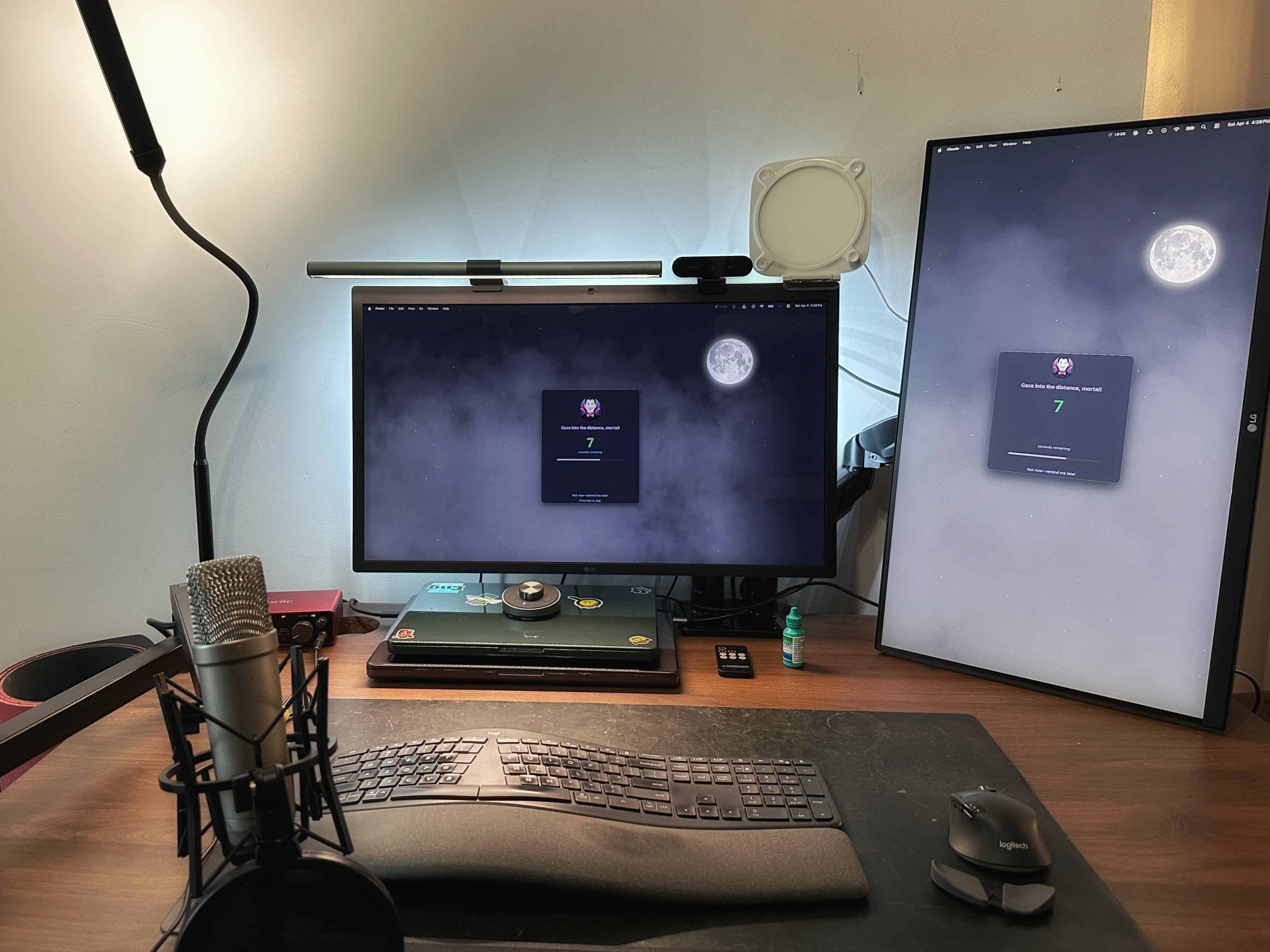
Count Tongula's Eye Break app demo
Count Tongula's Eye Break in action
My Free Eye Break App
Now, how can you get better at doing this? Well, I built a free app called Count Tongula's Eye Break — which if you don't know, Count Tongula is my alias because I'm obsessed with vampires and I just love everything about them. 🧛
This is a free macOS menu bar app that helps enforce this rule for you. Because let's be honest — you're probably not going to remember every 20 minutes to do this. And what better way than to use the thing you're staring at all day to help you remember?
So what does it do? Every 20 minutes it will, with your permission, dim your screen with a beautiful Count Tongula-themed fog overlay and remind you to look away. It shows you a timer. And it also has that longer stretch break built in that the American Optometric Association recommended — which will trigger based on a set interval that you can customize.
Some other cool stuff I built in:
If your screen is locked or your Mac sleeps, the timer pauses — so when you come back you're not automatically hit with an eye break reminder
Multi-monitor support — if you're a coder like me or someone in tech who uses multiple monitors, this will make sure it dims all of them
It automatically pauses during meetings and presentations — so you won't get a fog overlay popping up in the middle of a screen share
And a lot more — streak tracking, stretch break reminders, 14 system sounds, fully customizable intervals, and a full Dracula-themed UI. Check out all the features here.
It's totally free and available on my website for download. Currently it's only available for Mac, but I am working on supporting Windows too because somebody emailed me and asked for it.
Now what else can you do about your monitor setup to improve your eye health besides taking breaks?
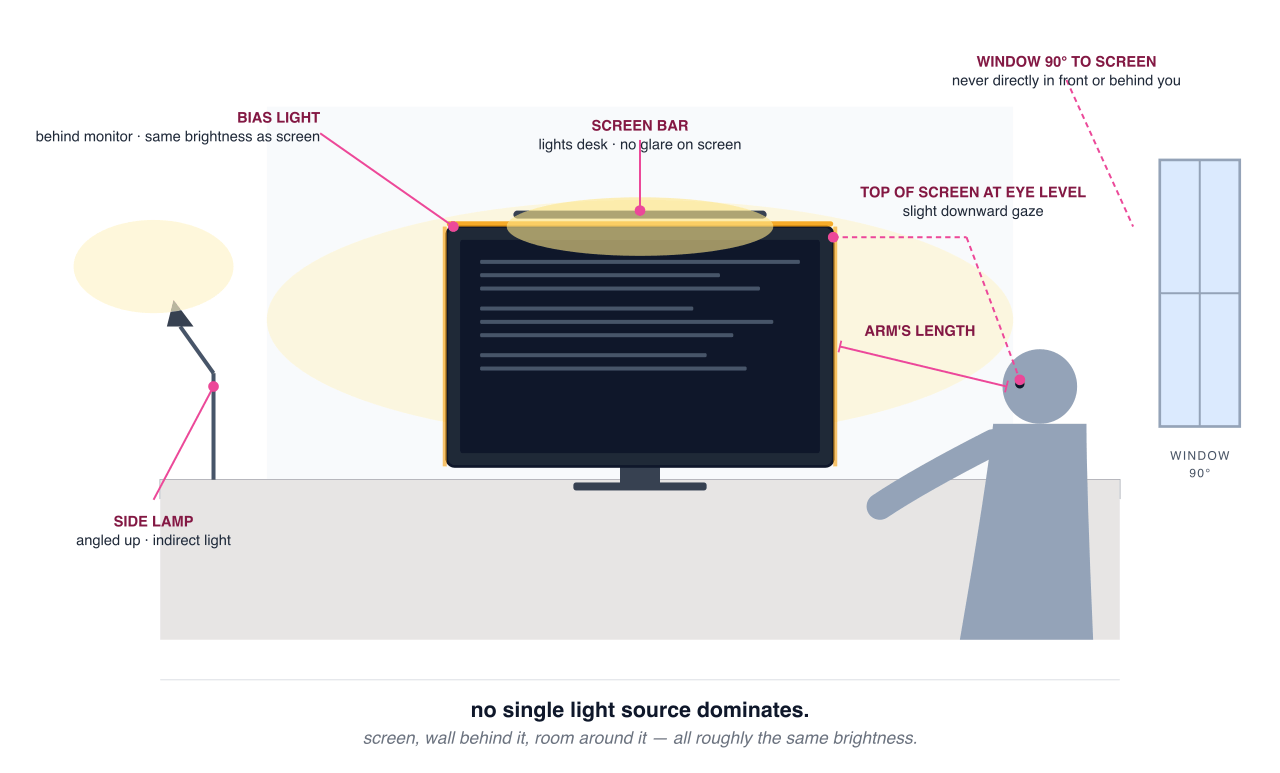
No single light source dominates.
Distance
Super important — your monitor should always be at least an arm's length away from you. Now, if you are on a laptop, that might be different. But for the most part, try to put it a bit farther away from you and then increase the font size if it's way too tiny for you to see. That distance is going to help you a lot.
Your Monitor's Resolution
One more thing on monitors — I use an LG UltraFine 5K display and the reason is that higher pixel density will always result in sharper text. Sharper text means your eyes don't have to work as hard to focus. It's basically the same ciliary muscle thing we've been talking about this whole article — if the text on your screen is crisp, those muscles can relax a little more.
If you're still on a 1080p monitor, you should seriously consider upgrading to at least 4K or higher. It's probably one of the single best things you can do for your eye health besides taking breaks.
The top of your screen should be at or slightly below your natural eye level when you're sitting down or standing. Angle it slightly upward so your neck stays neutral and you're looking very slightly down — this helps both your eyes and your posture.
The Lighting Setup Nobody Talks About
This one is super important — bias lighting. Bias lighting is light behind your monitor that illuminates the wall behind it. Now, if you have a desk with no wall behind it, you might want to move your desk or put some kind of panel behind it. You basically want to light the space behind your monitor.
The reason you want to do this is that when you're staring at a screen, your pupils decide how much to dilate based on the amount of light around the screen that you're looking at. So if you can lower the contrast between the amount of light radiating from the screen itself and get it to the same level of light that is behind the monitor, you can help your pupils reach a more stable level of dilation.
What I'd recommend is a dedicated bias light strip that goes directly behind your monitor — ideally covering the top edge at minimum, but preferably all 3-4 edges if you can afford it. Make sure you measure your monitor before you buy one — these strips come in different lengths and you want one that actually fits.
✅ What I use:MediaLight MK2 Flex 6500K — this is a proper bias light with CRI 98, not just a random LED strip from Amazon. It's worth it, trust bruv.
I also have a BenQ ScreenBar sitting on top of my monitor. A screen bar is basically a light that mounts to the top of your display and lights your desk surface without creating glare on the screen. It's the best of both worlds — you get task lighting for your keyboard and desk area, but it doesn't mess with your screen contrast. If you're going to buy one thing from this list, I'd say bias lighting first, screen bar second.
The other type of lighting you want is a lamp off to the side that bounces light off a wall. This is separate from the bias light behind your monitor — this is about filling the room with indirect light so your screen isn't the only bright thing in your field of vision.
I'd say put it to the left or right of your desk, angled vertically so the light bounces off your top left or top right wall if you have a wall in front of your desk.
Another tip — don't have too much overhead lighting. The reason is that overhead lighting creates glare because there's too much light coming from on top of you. When you have glare on your screen, it's causing your eyes to work harder to see what's actually on the screen. You want to avoid glare at all costs.
Also — watch out for where your windows are relative to your screen. If a window is directly in front of you — behind your monitor — and letting in a lot of sunlight, the massive brightness difference between the window and your screen forces your eyes to constantly adjust. Your pupils want to constrict for the bright window but dilate for the dimmer display, and that tug-of-war fatigues your eyes fast. Having a window directly behind you isn't great either, since sunlight will reflect off your screen and cause actual glare. Ideally, windows should be to your left or right — at a 90-degree angle to your monitor. If you can't move your desk, at least get some blackout curtains or blinds.
This is why it's basically impossible to use a computer on a sunny day at the beach — there's too much glare and you can't actually see what's on the screen.
The goal is: no single light source dominates. Your screen, the wall behind it, and the space around your desk should all be roughly the same brightness. That's what your eyes want.
The Blinking Problem
You probably know that you need to blink a lot, right? Another big thing here is eye moisture. What I do is I keep a bottle of eye drops at my desk at all times. Every desk — my desk at work, my desk at home. Because if you have to go find your eye drops, you're not going to use them. That's just how humans work.
Every time Count Tongula's Eye Break tells me to take one of those longer five-minute breaks, I'll put in some eye drops — pull down the bottom of my lower eyelid to create a pocket, let the drop settle in, and then close my eyes for about two minutes. That two minutes is about how long it takes for the drop to actually absorb into your eye.
Pro tip I learned way too late: while your eyes are closed, gently press your finger on the inner corner of your eye — right where your eyelid meets your nose. This is called punctal occlusion and it basically blocks the little drainage duct that would otherwise send your eye drop straight down into your nasal passages instead of letting it absorb into your eye. Without this, a lot of the drop just drains into your nose and you're basically wasting the entire eye drop. Two minutes, eyes closed, gentle pressure on the inner corner. That's the technique. Watch Dr. Sunny here do it for you live at 0:36.
Here are my picks:
✅ My pick:Refresh Tears — solid everyday eye drops that get the job done.
⭐ Upgrade pick:Refresh Plus (Preservative-Free) — single-use vials with no preservatives, perfect if you're using drops more than a few times a day.
ALSO, if you are going to put eye drops in more than four times a day, you should switch to a preservative-free drop. The reason is that when you're using regular eye drops with preservatives, it can actually irritate your eyes with too much use. Think of it like any medicine — if you use it too much, there are side effects. Same principle.
TL;DR — Your Eye Health Checklist
Take breaks every 20 minutes and look at something 20 feet away for 20 seconds — download Count Tongula's Eye Break here to help you remember
Consider longer breaks too — 5-15 minutes every 2 hours
Monitor at arm's length away
Top of screen at or slightly below eye level
Upgrade to at least 4K — sharper text = less strain on your eyes
Put a bias light strip behind your monitor
Add an indirect lamp to the side — never let the screen be the only light source
Get a screen bar for glare-free desk lighting
Blink more + keep artificial tears on every desk — use them 2-4 times a day, eyes closed for 2 minutes after each drop!
If you're using drops more than 4x/day, switch to preservative-free!
My eyes don't hurt anymore. Yours shouldn't either.
I've been a software engineer for more than half a decade, previously at and . These are observations from the trenches — not predictions. I also built Count Tongula's Eye Break — a free, open-source macOS app that enforces the 20-20-20 rule.