
Ready to build? Jump to the companion article: Two Prompts That Turn Notion into Your Claude Project's Brain
If you use Claude Projects in the Claude app for non-code work — content strategy, product specs, brand guides, research — this is for you.
I had five files in my project. Strategy docs, published articles, reference material. Claude read them every conversation. Felt organized. Felt smart.
Then I deleted all of them.
Not because they were bad. Because Claude Projects has a gap that will drive you nuts the second you notice it: Claude can read your project files, but it can't update them. Read-only. Every single one. Desktop app, mobile app, web — doesn't matter. Same limitation everywhere.
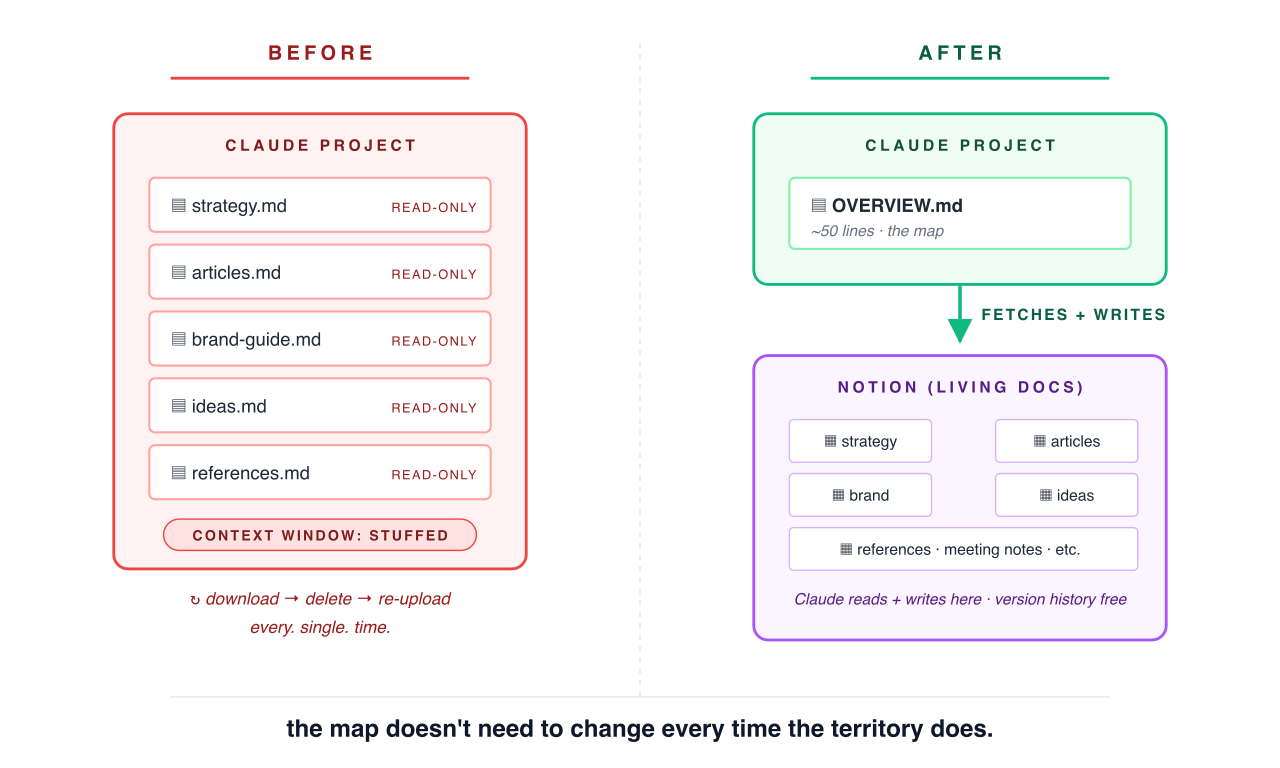
So if you have anything that evolves — a content strategy, a spec, a reference that changes over time — you're stuck in this loop: download the file, manually delete the old version from the project, re-upload the new one. Every. Single. Time. It's brutal. On mobile it's genuinely painful.
I spent a month testing workarounds. Tried three different approaches. One of them not only fixed the problem — it turned into a better architecture than editable project files would've been anyway.
The Obvious Thing Didn't Work
My first instinct was to just move everything to Notion and delete the project files entirely. Makes sense, right? Claude has Notion access via MCP. It can read pages, edit pages, create new database entries. Problem solved.
Except — not really.
Without project files, Claude starts every conversation blind. It doesn't know what pages exist in Notion, doesn't know the database IDs, doesn't know the structure. You'd have to re-explain your whole setup every single time. "Go to my Content Hub, the database ID is cx532... look for the article called..."
That's not a workflow. That's a chore.
Some people suggested using a GitHub repo with Claude Code instead. And sure, that works great — if what you're managing is code. But these aren't code files. They're content strategies, brand guides, idea banks, reference docs with images, project trackers. A repo treats all of that like source code — raw text in a file tree. No formatting, no inline images, no tables you can actually look at without squinting.
Notion gives you an app. You open it on your phone, your laptop, wherever — and your docs look like docs. Tables look like tables. Images are right there. You're not opening a terminal or learning git commands to check your content calendar. Not everything belongs in a developer tool, and the people who need to touch these docs — PMs, designers, content leads — shouldn't need to learn version control to update a brand guide.
The Thing That Actually Works: One File That Knows Where Everything Lives
Here's what I landed on — and it's almost embarrassingly simple.
One markdown file. Lives in your Claude Project. Maybe 40 lines long. I called mine OVERVIEW.md.
It doesn't contain your actual content. It's a map. Think of it like a table of contents for a book you keep in a different building. The overview file tells Claude: here's where the Notion hub lives. Here's the database ID. Here's what properties exist. Here's what's been published. Here are the rules and guidelines for this project.
That's it.
Claude reads this file automatically every conversation — because it's a project file. Instantly knows the lay of the land. When it needs the actual content of an article or a doc, it fetches from Notion. One tool call. Takes a few seconds.
And here's the key — Claude can write back. Edit a draft? Update a status? Add a new entry to the database? It just does it. In Notion. Where the content actually lives.
The project file stays lightweight and stable. The Notion database stays current and editable. They work together.
If you're an engineer who uses Claude Code, you already know this pattern — it's exactly what a CLAUDE.md file does for a codebase. A small file that tells Claude "here's how this project works, here's where things live." Same architecture, just for non-code work. And unlike project files, this setup lets Claude write back — Notion stays fully editable while the overview file stays lightweight and read-only.